Changing a Subscription
If a subscription has already been purchased, you can change it in the account settings (Settings → Billing → Upgrade subscription). Subscription is upgraded by paying the outstanding balance difference and does not affect the subscription expiration date.
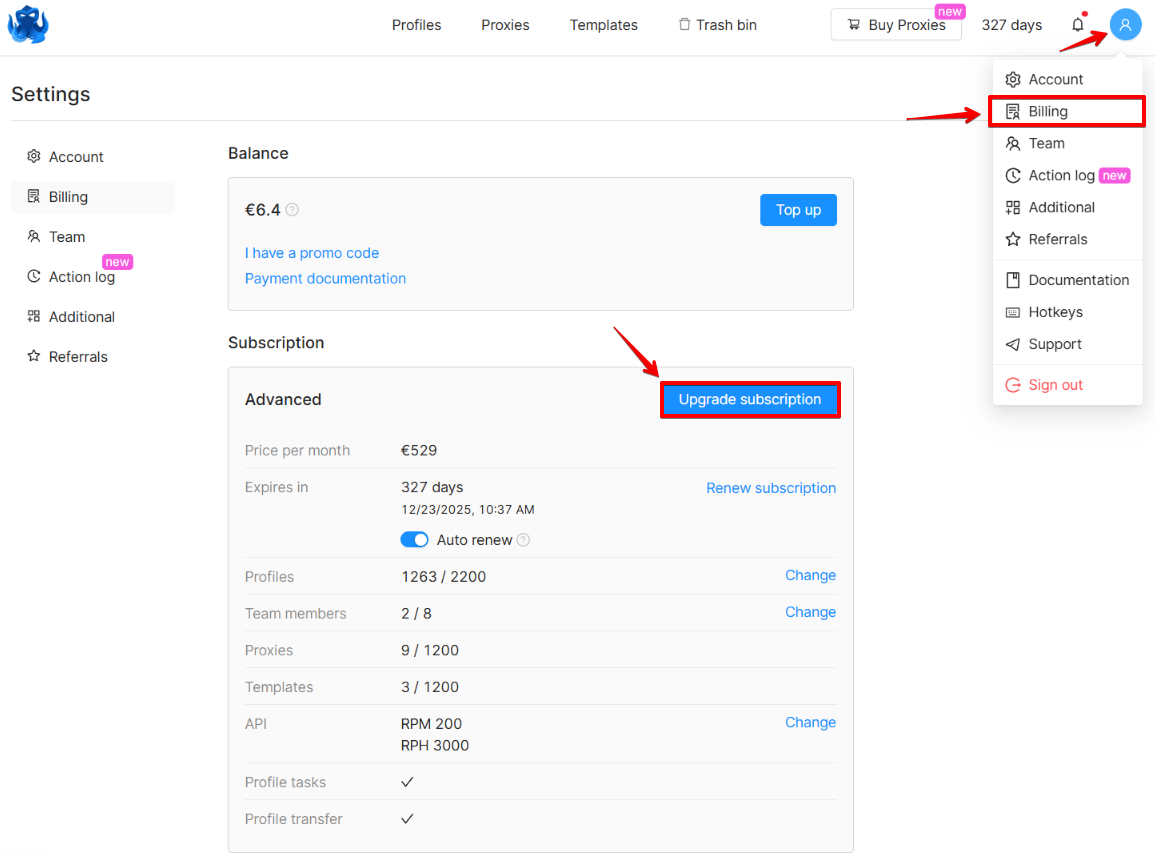
Surcharge calculation
The surcharge is calculated as follows:
(The cost of the desired subscription minus the cost of the current subscription) multiplied by (the number of remaining days divided by 30).
For example, you have 25 days of the Starter subscription left, and you would like to upgrade to Base, which means (79-29)*(25/30) = 42 tokens (the number is rounded up to integer).
If you previously purchased a long-term subscription (for 3/6/12 months), a discount may be applied when you upgrade your subscription. The discount is applied if you have 61 or more remaining subscription days. The discount amount is calculated based on the remaining subscription days. If you would like to learn more about this, please contact the Customer Service.
Downgrading a subscription
Downgrading the subscription is possible only after the expiration of your current subscription. To do this, you need to top up your account balance and choose a suitable subscription. Subscriptions can be purchased for 1 billing cycle (30 days) or more.
If you downgrade your subscription, you need to bring the existing resources (profiles, team members, tags, templates, icons) down to the amount supported by your new subscription. The excess resources must be removed.
Profiles in an unpaid account are stored for 6 months. At the end of the subscription period all profile data is saved. You can remove excess resources after purchasing a new subscription.
Additional resources
Purchasing additional resources
Additional resources allow you to modify your subscription and increase the number of features available to you. Purchasing additional resources is available for Starter and higher-tier subscriptions.
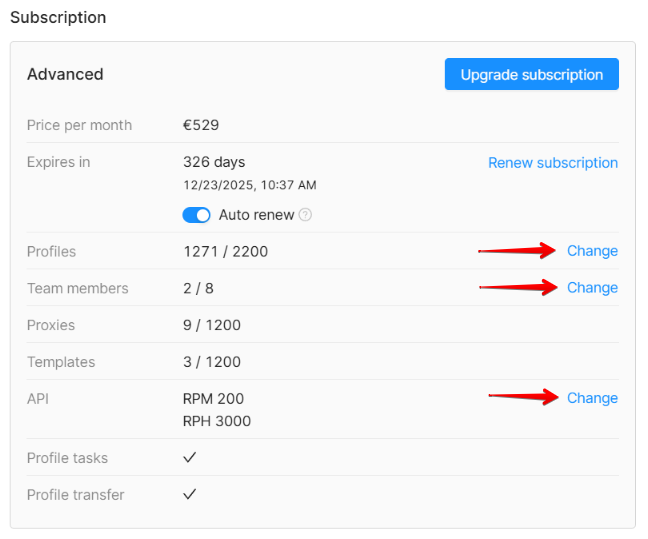
After choosing the desired number of additional resources, the system will automatically calculate the payment amount. If the subscription was purchased at a discount, the discount will be applied to the purchase of additional resources, taking into account the number of days remaining in the subscription.
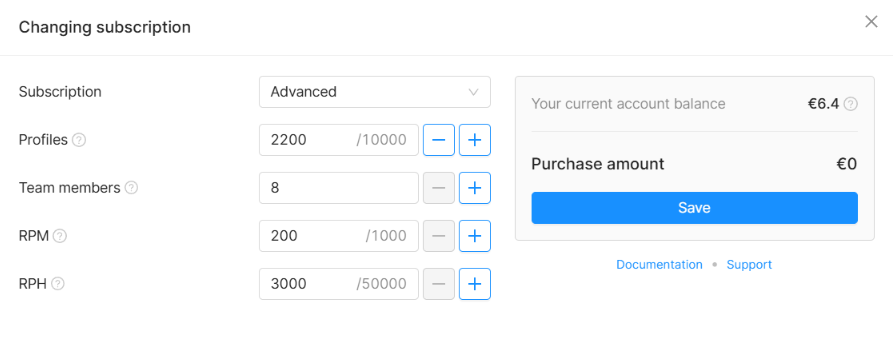
Downgrading additional resources
The user can reduce the amount of additional resources and get back some of the spent tokens. You can downgrade additional resources once per billing cycle (30 days). The user will receive 70% of the downgrade (reduction) sum.
Managing subscriptions
Changing account email
To change the email address associated with your account, contact our Customer Service and specify:
- your current account email address
- the new email address
Please note: the new email address must not have been previously used for an Octo Browser account registration.
Once we receive the data, we will send a message to your current account email with a link to confirm access to your Octo Browser account.
Additionally, a verification code will be sent to the new email address to confirm its availability.
After you change your account email address, all account actions will only be available from the new email address.
Transferring tokens between different Octo Browser accounts
Tokens can be transferred once per day. Tokens are transferred to another Octo Browser account in full and cannot be split into parts. Bonus and promotional tokens are not transferable.
To transfer tokens, contact our Customer Service.
Once we receive your request, we will send a message to the main account email with a link to confirm access to your Octo Browser account. The link is valid for one hour.
Terminating an Octo Browser subscription
To terminate your subscription, contact our Customer Service.
Once we receive your request, we will send a message to the main account email with a link to confirm access to your Octo Browser account. The link is valid for one hour.
Once verification process is complete, tokens for unused days will be returned to the account balance, and the subscription will be terminated. Tokens are returned to the account balance as integers, without taking the fractional part into account and without rounding. You can reactivate the account later by topping up the account balance and activating the subscription for an entire billing cycle (30 days).
Only subscriptions purchased for one full billing cycle (30 days) without any discounts can be terminated. If the subscription has been purchased with a discount, it is impossible to terminate it and return the tokens to the balance.
Account activation to transfer profiles
To activate your account to transfer profiles, contact our Customer Service.
Once we receive your request, we will send a message to the main account email with a link to confirm access to your Octo Browser account. The link is valid for one hour.
Once we process the request, the account will be activated for 30 minutes, during which you can log in and transfer profiles.
Account activation for profile transfers is available with Base or higher subscriptions.
Deleting an Octo Browser account
To delete your account, contact our Customer Service.
Once we receive your request, we will send a message to the main account email with a link to confirm access to your Octo Browser account. The link is valid for one hour.
If you are a team member, contact your team leader to have your account deleted.
Please note that all data on your account, including all profiles, will be permanently deleted.
Renewing a subscription for less than 30 days
For active subscriptions starting from the Base tier and higher, subscription extension for 3 days or more is available once per billing cycle. The cost is calculated based on the cost of the subscription for 1 day. You can only renew a subscription that was previously purchased for 30 days or longer.
IMPORTANT!
The next subscription activation will be available only for the full billing cycle (starting from 30 days).